

Introduction
If your business relies heavily on networked IT resources, virtualization is worth serious consideration. By abstracting applications and their components away from the underlying hardware, virtualization provides a logical view of resources that differs from the physical infrastructure. This enables organizations to maximize performance, availability, and flexibility.
What Virtualization Does
- Resource abstraction: Surplus bandwidth, memory, storage, or processing power can be pooled and allocated dynamically.
- Flexible views: Many computers can appear as one resource, or one machine can act as many.
- Storage flexibility: Large storage assets can be divided into smaller logical units, or multiple small devices can be combined into one.
Business Benefits
Virtualization can deliver:
- Reliability and high availability of IT resources
- Scalability to meet growing demands
- Agility in adapting to new workloads
- Unified security and management across systems
- Improved system performance through optimized resource use
Types of Virtualization
1. Network Virtualization
- Creates a logical view of the network that differs from the physical layout.
- Users only see the systems they are authorized to access.
- Multiple links can appear as a single connection.
2. Storage Virtualization
- Hides the physical location of storage devices.
- Allows multiple systems to transparently share the same storage resources.
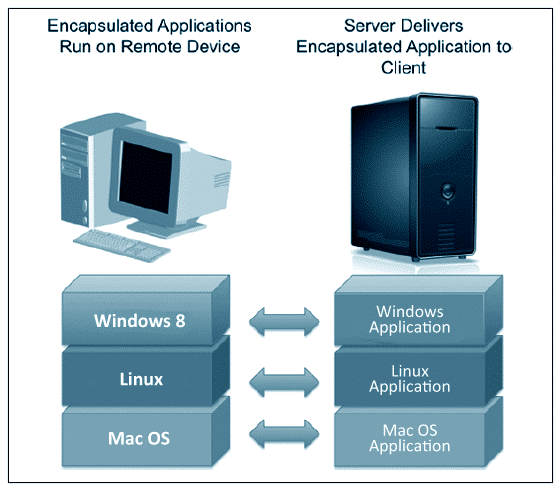
3. Application Virtualization
- Runs applications on different operating systems and hardware platforms.
- Advanced implementations can restart failed apps, balance workloads, or spawn new instances automatically.
4. Access Virtualization
- Any authorized device can access any application without compatibility issues.
- Enables device/application independence and shared client systems.
5. Processing Virtualization
- Hides physical hardware configuration from applications and operating systems.
- Makes one system appear as many, or many systems appear as one.
- Supports performance, scalability, and consolidation goals.
Choosing the Right Approach
Your choice of virtualization technology depends on your business objectives. Whether you need scalability, reliability, or cost efficiency, virtualization offers a path to modernize IT and unlock new capabilities.
Conclusion
Virtualization is not a one‑size‑fits‑all solution, but its benefits are clear: improved performance, flexibility, and resilience. By understanding the different types of virtualization, you can determine the best approach for your organization.