
What a hypervisor does
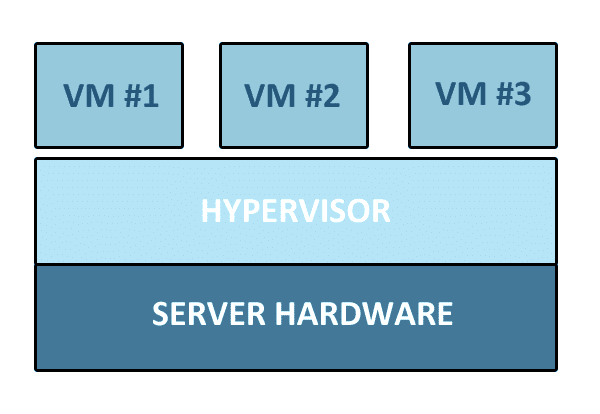
A hypervisor allocates a computer’s processor, memory and other resources to virtual machines. Each virtual machine runs its own operating system, allowing separate workloads to share physical hardware.
What Is a Hypervisor?
A hypervisor is the software layer that enables virtualization. It manages:
- Processor and memory allocation
- Resource sharing across virtual machines (VMs)
- Multiple instances of the same OS
- Different operating systems running simultaneously
Without the hypervisor, virtualization as we know it would not exist.
Two Types of Hypervisors
1. Native or Bare‑Metal Hypervisors (Type 1)
- Run directly on the server hardware
- Manage guest operating systems without an underlying host OS
- Examples include Microsoft Hyper-V and VMware ESXi. Hyper-V remains a type 1 hypervisor even when enabled through Windows.
2. Hosted Hypervisors (Type 2)
- Run on top of a host operating system
- Provide virtualized I/O and memory management through the host
- A hosted example is Oracle VirtualBox. VMware Server and Microsoft VirtualPC were historical examples, not recommendations for a new deployment.
Visualizing the Difference
- Type 1: Hardware → Hypervisor → Virtual Machines
- Type 2: Hardware → Host OS → Hypervisor → Virtual Machines
The key distinction lies in where the hypervisor runs: directly on hardware (Type 1) or on top of a host OS (Type 2).
Why It Matters
- Suitability: Assess isolation, patching, hardware support, licensing and recovery. A type label alone does not guarantee speed or security.
- Flexibility: Type 2 hypervisors are easier to set up for testing, development, or personal use.
- Scalability: Both types allow organizations to maximize hardware utilization and reduce costs.
Conclusion
Choose a supported platform by testing your workloads, backup restoration and recovery after a host failure. The Microsoft Hyper-V overview and Oracle VirtualBox manual explain their architectures. For business workloads, review Cloud & Infrastructure and Security & Continuity, or discuss virtualisation with an engineer.